Teaching a Local LLM a New Domain
As an interesting experiment I wanted to learn how to teach a tiny local llm a new domain by doing Continued Pretraining (CPT) on domain specific data. This article is a write-up of my experiences from using Unsloth to train qwen 3 4B to act as a travel advisor for a fictional city.
Continued Pretraining (CPT)
As the name suggests, CPT is a continuation of the model’s initial training, typically on a specific domain to allow the model to specialize on top of what it already knows.
Normally, full CPT on a model of any size would be impractical on consumer hardware due to high VRAM requirements. However, there is a clever workaround called LoRA (Low-Rank Adaption). The basic idea behind LoRA is that the original model weights are kept frozen while small trainable LoRA adapters are attached to some of the layers of the model. During training, we only update the parameters in the LoRA adapter. In practice this means we only have to touch a fraction of the full set of parameters.
Example: I am working with qwen 3 4B, which has 4 billion trainable parameters. However with my current LoRA configuration, I am only targeting 66 million parameters - 1.6% of the total number of parameters!
To do the actual LoRA based CPT training I am using a framework called Unsloth. I have included the full source here in case you are interested in checking it out.
Domain
The domain can be anything, but I decided to try to teach the model to act as a travel advisor for a fictional city called Awesomeville in the country of Greatness. Everything about the city is made up of course, but the town has its own subway with multiple historical sites located near the subway stations.
The goal of this exercise is to teach the model to reason about the subway map and belonging historical sites.
As an example I want the model to reliably answer questions like: What is the subway route from Museum of Greatness History to Founder's Square?
As an illustration, I have added a snapshot of the subway map below:
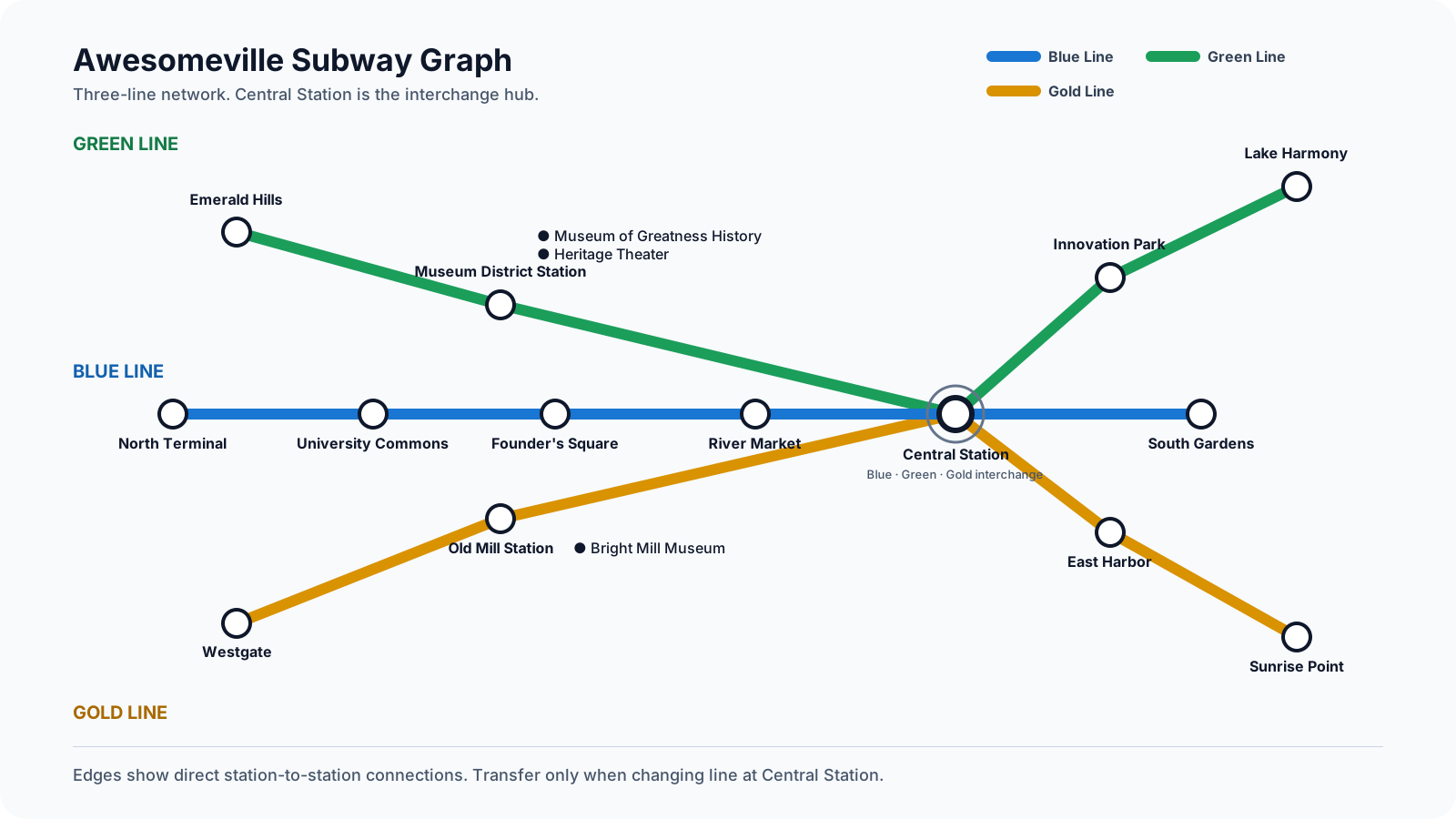
As you can see there are three subway lines in the city (Green, Blue and Gold) with various stations located near historical sites in town.
The map also shows that the lines connect through central station, so a travel advisor needs to be able to reason and recommend multi-line routes. Some of the key scenarios are listed below:
- Same line travel (e.g. Blue line stations only)
- Single transfer through Central station (e.g. Starting on Blue line and transferring to Green line)
- Connect trips with multiple transfers (e.g. Blue -> Green -> Gold)
Corpus
Create Data
As expected, the most time-consuming part of this project by far was defining the corpus, the collection of data used to train the model. Since the entire universe of Awesomeville is fictional, all data had to be synthesized. Using an agent for this is of course the most practical solution these days, but it’s not as easy as just asking an agent for a perfect training corpus.
I discovered a few pitfalls when synthesizing data using agents.
One thing to keep in mind is that agents often create text generators, which may lead to templated language with lots of repetition from shared intros and fragments. Too much common phrasing around a few variables like station names may make it harder for the model to learn the subtle differences.
Another issue is that agents generate data so fast that it’s easy to lose track, and before you know it, your corpus has grown to 10k entries of questionable quality.
One of the key goals of this exercise was to come up with a set of training data that would enable the model to reason. I wanted to avoid a situation where the data consists of a large amount of specific route examples since this tends to lead to route memorization and likely poor generalization.
Structuring the Data
Experimental Phase
The first draft of my training data was sort of a disaster. Initially, I felt like I was moving in the right direction but before I knew it, I had generated a 10k bloated dataset that relied far too much on memorization of specific route scenarios. Performance would often be poor when unseen examples were introduced. The large dataset did slow down training, but I learned that when working with large datasets, you may not need to train from scratch after every change. Instead, you can split your training into multiple phases. I would start with pre-training using the full dataset followed by post training on the pre-trained model. Post training would be the same Unsloth process, but using a smaller, much more targeted dataset.
Re-Design
Luckily, I realized quickly that I had to start over and build up the training data incrementally and put more thought into the design. I would first start with training data for simple single line travel, then move to one-line-transfers and two-line-transfers. Finally, I added bindings from subway stations to historic sites.
As I was building out the model’s training set, I also built a comprehensive test suite for doing evals to gauge how well training was progressing. Out of a full test suite of 105 tests, 85 of the scenarios were scenarios that were not covered directly during training. See table below with summary:
| Test scenario | Tests | Share | What it tests | Truly held out | Partially represented | Directly represented |
|---|---|---|---|---|---|---|
| Green same-line journey | 9 | 8.6% | Correct Green Line selection; no transfer | 5 | 0 | 4 |
| Blue same-line journey | 16 | 15.2% | Correct Blue Line selection; no transfer | 12 | 0 | 4 |
| Gold same-line journey | 9 | 8.6% | Correct Gold Line selection; no transfer | 5 | 0 | 4 |
| One-transfer journey | 33 | 31.4% | Origin line → central_station → destination line | 31 | 0 | 2 |
| Two-journey / errand scenario | 33 | 31.4% | Solve two routes independently; reset state between journeys | 27 | 6 | 0 |
| Historic-site → historic-site | 5 | 4.8% | Resolve both sites to stations, then route between them | 5 | 0 | 0 |
| Total | 105 | 100% | 85 | 6 | 14 |
One of the things that surprised me is how much I was able to shrink the original corpus and still have decent performance. However, I did notice that the small qwen model would often struggle to reliably transfer between lines in single-transfer and two-transfer scenarios.
Based on this observation I decided to try to map the original subway map onto an internal representation using synthetic names as seen in the graphic below. The main benefit of this is that the synthetic names make it easier on the small qwen model since line membership is encoded in the name. You also get some help with ordinals from the numeric suffix. I did a similar thing to the historic site mappings.
Awesomeville Subway Map
Original human-readable station names mapped to the locked synthetic naming convention. Line names remain unchanged; Central Station is the shared interchange represented by central_station.
Blue Line
blue_station_oneblue_station_twoblue_station_threeblue_station_fourcentral_stationblue_station_sixGreen Line
green_station_onegreen_station_twocentral_stationgreen_station_fourgreen_station_fiveGold Line
gold_station_onegold_station_twocentral_stationgold_station_fourgold_station_fiveBased on eval performance, moving to synthetic names in the internal map representation resulted in a performance gain of 24% in accuracy. Most of the gains came in scenarios covering line transfers.
Complete Corpus
After the redesign I ended up with a total of 700 entries across 30 categories in my full training dataset. I have included a link to the dataset here.
I have also included a grouping of the data categories below:
| Category | Count | Share | Section | Actual example from corpus |
|---|---|---|---|---|
historic_direct_binding |
208 | 29.7% | city_training_historic_sites |
historic_binding_blue_historic_site_three_001
blue_historic_site_three blue_station_three |
station_line_membership |
84 | 12.0% | city_training_membership |
membership_blue_station_one_001
STATION: blue_station_one LINE: Blue Line |
routing_rule |
30 | 4.3% | city_training_transfers |
routing_rule_001
ROUTING_RULE: If origin and destination are on the same line, remain on that line and set TRANSFER_COUNT: 0. |
multi_journey_rule |
28 | 4.0% | city_training_transfers |
multi_journey_rule_001
MULTI_JOURNEY_RULE: Solve each journey independently. |
cross_line_output_rule |
24 | 3.4% | city_training_output_contract |
cross_line_output_rule_v11_001
CROSS_LINE_OUTPUT_RULE CONDITION: ORIGIN_LINE != DESTINATION_LINE OUTPUT: - origin station - origin line - central_station as the transfer - destination line - destination station DO NOT OUTPUT: - non-transfer intermediate stations |
positive_output_demo |
24 | 3.4% | city_training_output_examples |
positive_same_line_output_v12_001
QUESTION: What is the subway route from blue_station_two to blue_station_four? ANSWER: Take Blue Line from blue_station_two to blue_station_four. No transfer is required. |
routing_decision_rule |
24 | 3.4% | city_training_route_rules |
routing_decision_rule_v11_001
ROUTING_DECISION_RULE 1. Resolve origin to a subway station if needed. 2. Resolve destination to a subway station if needed. 3. Determine ORIGIN_LINE. 4. Determine DESTINATION_LINE. 5. If ORIGIN_LINE == DESTINATION_LINE: TRANSFER_COUNT = 0. 6. If ORIGIN_LINE != DESTINATION_LINE: TRANSFER_COUNT = 1 at central_station. |
same_line_output_rule |
24 | 3.4% | city_training_output_contract |
same_line_output_rule_v11_001
SAME_LINE_OUTPUT_RULE CONDITION: ORIGIN_LINE == DESTINATION_LINE OUTPUT: - origin station - line name - destination station - no transfer DO NOT OUTPUT: - central_station unless it is origin or destination - intermediate stations |
nontransfer_output_invariant |
20 | 2.9% | city_training_output_contract |
nontransfer_output_invariant_v10_001
NON_TRANSFER_OUTPUT_INVARIANT CONDITION: origin and destination use the same subway line. TRANSFER_COUNT: 0 FINAL_OUTPUT: origin + line + destination + no transfer OMIT: all intermediate stations OMIT: central_station unless central_station is itself the origin or destination |
routing_summary_rule |
20 | 2.9% | city_training_output_contract |
routing_summary_rule_v10_001
ROUTE_OUTPUT_SELECTION_RULE If TRANSFER_COUNT = 0: - output origin station - output subway line - output destination station - state no transfer - do not output intermediate stations - do not mention central_station unless it is origin or destination If TRANSFER_COUNT = 1: - output origin station and origin line - output central_station as the transfer station - output destination line and destination station - do not output other intermediate stations |
central_balanced_decision |
18 | 2.6% | city_training_transfers |
central_balanced_continue_v4_001
CENTRAL_ROUTE_DECISION CURRENT_LINE: Blue Line DESTINATION_LINE: Blue Line AT: central_station ACTION: CONTINUE TRANSFER_COUNT: 0 |
central_transfer_decision |
18 | 2.6% | city_training_transfers |
central_decision_001
CURRENT_LINE: Blue Line REQUIRED_LINE: Blue Line AT: central_station ACTION: STAY TRANSFER_COUNT: 0 |
historic_routing_rule |
18 | 2.6% | city_training_historic_sites |
historic_routing_rule_v11_001
HISTORIC_ROUTING_RULE 1. Resolve historic_site -> access_station. 2. Replace the historic-site token with the station. 3. Use that station's line membership for routing. 4. Final route output uses station identifiers only. |
multi_journey_decision_rule |
18 | 2.6% | city_training_transfers |
multi_journey_decision_rule_v11_001
MULTI_JOURNEY_DECISION_RULE For each journey independently: 1. resolve origin and destination 2. determine origin line and destination line 3. decide transfer count 4. output only routing-relevant endpoints, lines, and transfer 5. reset before the next journey |
transfer_output_invariant |
16 | 2.3% | city_training_output_contract |
transfer_output_invariant_v10_001
TRANSFER_OUTPUT_INVARIANT CONDITION: origin and destination require different subway lines. TRANSFER_COUNT: 1 FINAL_OUTPUT: origin + origin line + central_station transfer + destination line + destination OMIT: all non-transfer intermediate stations |
historic_resolution_invariant |
12 | 1.7% | city_training_historic_sites |
historic_resolution_invariant_v9_001
ENTITY_RESOLUTION_INVARIANT historic_site -> access_station After resolution, the historic-site identifier is no longer a routing node. FINAL_ROUTE may contain station identifiers only. |
multi_journey_demo |
12 | 1.7% | city_training_transfers |
multi_journey_demo_001
JOURNEY_1: Take Green Line from green_station_five to central_station; transfer at central_station to Blue Line; continue to blue_station_two. END_JOURNEY_1 RESET_ROUTE_STATE JOURNEY_2: Take Blue Line from blue_station_two to central_station; transfer at central_station to Gold Line; continue to gold_station_five. |
transfer_invariant |
12 | 1.7% | city_training_transfers |
transfer_invariant_v3_001
TRANSFER_INVARIANT: A transfer occurs only when the subway line changes. |
multi_journey_line_roles |
9 | 1.3% | city_training_transfers |
multi_journey_line_roles_v3_001
TWO_JOURNEY_LINE_ROLES JOURNEY_1_ORIGIN_LINE: Blue Line JOURNEY_1_DESTINATION_LINE: Green Line JOURNEY_1_ACTION: ride Blue Line to central_station; transfer to Green Line; finish journey 1. RESET_ROUTE_STATE JOURNEY_2_ORIGIN_LINE: Green Line JOURNEY_2_DESTINATION_LINE: Gold Line JOURNEY_2_ACTION: ride Green Line to central_station; transfer to Gold Line; finish journey 2. |
same_line_central_invariant |
9 | 1.3% | city_training_transfers |
same_line_central_invariant_v4_001
SAME_LINE_CENTRAL_CASE ORIGIN: blue_station_two DESTINATION: blue_station_six LINE: Blue Line RULE: If the route passes through central_station, remain on Blue Line. ACTION_AT_CENTRAL: CONTINUE TRANSFER_COUNT: 0 |
same_line_route_demo |
9 | 1.3% | city_training_route_demos |
same_line_demo_001
ORIGIN: blue_station_one DESTINATION: blue_station_three LINE: Blue Line STATIONS: blue_station_one -> blue_station_two -> blue_station_three TRANSFER_COUNT: 0 |
single_transfer_route_demo |
9 | 1.3% | city_training_route_demos |
transfer_demo_001
Take Blue Line from blue_station_one to central_station; transfer at central_station to Green Line; continue to green_station_five. |
destination_invariant |
8 | 1.1% | city_training_route_rules |
destination_invariant_v9_001
DESTINATION_INVARIANT: The requested destination is fixed and must not change during route construction. |
historic_graph_rule |
8 | 1.1% | city_training_historic_sites |
historic_graph_rule_v8_001
HISTORIC_GRAPH_RULE 1. Resolve the historic-site identifier to its access station. 2. Replace the historic-site identifier with that station. 3. Route between stations using canonical graph rules. 4. Use station identifiers, not historic-site identifiers, in the route output. |
line_output_invariant |
8 | 1.1% | city_training_output_contract |
line_output_invariant_v9_001
LINE_OUTPUT_INVARIANT: Every final route must explicitly name each subway line used. |
multi_journey_graph_rule |
8 | 1.1% | city_training_transfers |
multi_journey_graph_rule_v8_001
MULTI_JOURNEY_GRAPH_RULE For each journey independently: 1. resolve origin/destination, 2. read required canonical graph(s), 3. construct the route, 4. finish the journey, 5. discard active route state before the next journey. |
multi_journey_output_rule |
8 | 1.1% | city_training_output_contract |
multi_journey_output_rule_v10_001
MULTI_JOURNEY_OUTPUT_RULE: Summarize each journey independently. Output only its origin, required line or lines, any actual transfer at central_station, and its destination. Do not carry intermediate stations or transfer state into the next journey. |
historic_route_composition_demo |
6 | 0.9% | city_training_historic_sites |
historic_route_demo_001
Resolve blue_historic_site_three -> blue_station_three. Resolve gold_historic_site_two -> gold_station_two. Then route only between station identifiers. Take Blue Line from blue_station_three to central_station; transfer at central_station to Gold Line; continue to gold_station_two. |
route_output_invariant |
6 | 0.9% | city_training_output_contract |
route_output_invariant_v5_001
ROUTE_OUTPUT_INVARIANT Every route answer must explicitly name the subway line used. |
destination_central_invariant |
2 | 0.3% | city_training_transfers |
destination_central_invariant_v5_001
DESTINATION_CENTRAL_INVARIANT If central_station is the destination, stop when central_station is reached. Do not transfer after reaching the destination. |
The most stubborn scenarios to stabilize were related to bindings between historic sites and subway stations. I used the same trick of mapping human readable names to internal names, but ~30% of the training data had to be dedicated to enforcing these mappings.
Another stubborn case was determining transfer vs. no transfer for a subway journey. The main challenge is that all transfers occur through Central Station, but the model still needs to distinguish same line journeys from cross line journeys when passing through Central Station.
One of the key points to enforce is that just passing through Central Station should not automatically trigger a transfer. It must occur in combination with the origin and destination being on different lines.
Another side effect of enforcing this point was that the model would often incorrectly tack on Central Station to a single line journey. Almost as if it was trying to prove the point that passing through Central Station wouldn’t trigger a transfer for same line travel.
To counteract this, I introduced a few targeted rules in the same_line_central_invariant category. See one example below:
Overall Performance
I had to go through multiple iterations to arrive at a high performing dataset. However, at this point I would say model performance is very good. I think it’s fair to say that the model can generalize well and reason across historic sites, lines and stations.
Out of 105 eval cases, only two tests fail now. The two failing tests both fail because of incorrectly including Central Station on a journey on the same line. The targeted enforcement described above helped with several of these cases, but the underlying issue isn’t 100% solved.
Another area of improvement is ordinals and enumerating the full sequence of stations along a complete journey. The model is very good at mapping full journeys from origin to destination but is not trained to correctly list the full list of stations along the way. The model does get some help with ordinals from the numeric suffix in the station name, but more training scenarios are needed to enforce this point. It’s not a critical skill for route recommendations though.
I have included the full repo here in case you are interested having a look.